> For the complete documentation index, see [llms.txt](https://chaoslabz.gitbook.io/viewgraph/llms.txt). Markdown versions of documentation pages are available by appending `.md` to page URLs; this page is available as [Markdown](https://chaoslabz.gitbook.io/viewgraph/readme.md).
# What is ViewGraph?
> *Built with Kiro, for Kiro - and every MCP-compatible coding agent.*
See a bug. Click it. Describe it. Your agent fixes it.

[](https://chromewebstore.google.com/detail/viewgraph-capture/dmgbneoidgmkdcfnlegmfijkedijjnjj) [](https://addons.mozilla.org/en-US/firefox/addon/viewgraph-capture/)
[](https://www.npmjs.com/package/@viewgraph/core) [](https://github.com/sourjya/viewgraph)
***
## The Problem
{% hint style="danger" %}
**AI coding agents can read your source code. They cannot see your rendered UI.**
{% endhint %}
And when they try, they waste enormous resources doing it.
{% hint style="warning" %}
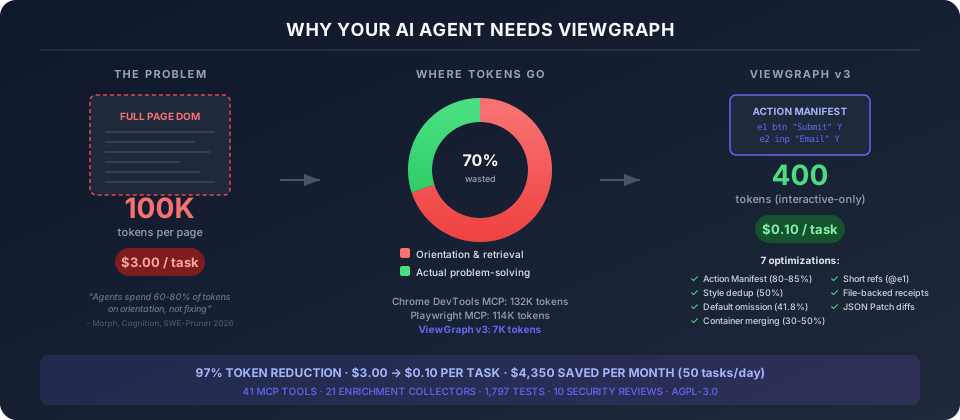
**AI agents spend** [**60-80% of their tokens**](https://arxiv.org/html/2601.14470v1) **on orientation, not problem-solving.** Every wasted token is wasted compute, wasted energy, and avoidable carbon emissions. With data center energy demand projected to [double by 2030](https://www.iea.org/news/ai-is-set-to-drive-surging-electricity-demand-from-data-centres-while-offering-the-potential-to-transform-how-the-energy-sector-works), responsible AI means giving agents exactly the context they need - nothing more.
{% endhint %}
* The agent **guesses** CSS fixes instead of seeing the actual layout
* Bug reports land as **vague screenshots** instead of structured evidence
* Accessibility audits find violations but **no path to the source file**
* Visual regressions **slip through** because tests check behavior, not structure
* QA handoffs require **back-and-forth** to clarify what's actually broken
These problems cost teams hours per bug - and burn tokens doing it. ViewGraph solves [23 of them](/viewgraph/why-viewgraph.md) with **97% fewer tokens** than full-capture approaches.
***
## How It Works
You click the broken element. You describe what's wrong. You send it to your agent.
The agent receives the element's exact CSS selector, computed styles, accessibility state, bounding box, network errors, console warnings - and your comment. It finds the source file and fixes the code.
No screenshots with arrows. No copy-pasting from DevTools. No "the button is somewhere on the settings page."

Works with any web app regardless of backend. Python, Ruby, Java, Go, PHP - if it renders HTML, ViewGraph captures it.
***
## Get Started in 2 Minutes
**Step 1.** Install the browser extension (Chrome or Firefox links above)
**Step 2.** Add to your AI agent's MCP config:
```json
{
"mcpServers": {
"viewgraph": { "command": "npx", "args": ["-y", "@viewgraph/core"] }
}
}
```
**That's it.** The server runs automatically and learns your project from the first capture.
{% hint style="info" %}
**Need version pinning?** `npm install -g @viewgraph/core && viewgraph-init`. See [Installation](/viewgraph/getting-started/installation.md) for all options.
{% endhint %}
For the full walkthrough with screenshots, see the [Quick Start Guide](/viewgraph/getting-started/quick-start.md).
***
## Who It's For
| | |
| ------------------------------ | -------------------------------------------------------------------------------------------------------------------------------------------------------------- |
| **Developers with AI agents** | See bug → click → describe → agent fixes. Works with Kiro, Claude Code, Cursor, Windsurf, Cline, Aider. |
| **Testers and QA** | Same workflow, no agent needed. Export as Markdown (Jira/GitHub) or ZIP report with screenshots. |
| **Non-technical stakeholders** | Click what looks wrong, describe it in plain language. ViewGraph captures the technical details. |
| **Test automation teams** | Capture DOM during Playwright tests. Generate test files from browser captures. [`@viewgraph/playwright`](https://www.npmjs.com/package/@viewgraph/playwright) |
See [Who Benefits?](/viewgraph/who-benefits.md) for the full breakdown.
***
## What Makes It Different
| | ViewGraph | Screenshots + chat | Browser DevTools |
| ----------------------------------- | --------- | ------------------ | ---------------- |
| Agent gets structured DOM context | ✅ | ❌ | ❌ |
| Works with any MCP agent | ✅ | ❌ | ❌ |
| Non-technical users can report bugs | ✅ | ✅ | ❌ |
| Accessibility audit built in | ✅ | ❌ | Partial |
| Captures network + console errors | ✅ | ❌ | ✅ (manual) |
| Export to Jira/GitHub markdown | ✅ | ❌ | ❌ |
| 92.1% capture accuracy (measured) | ✅ | N/A | N/A |
[Full comparison](/viewgraph/how-it-compares/overview.md) | [Capture accuracy details](/viewgraph/how-it-compares/accuracy.md) | [41 MCP tools](/viewgraph/features/mcp-tools.md)
***
## Your Agent Is Wasting Tokens
{% hint style="warning" %}
Research shows AI agents spend **60-80% of their token budget** on finding information, not fixing problems. One study found an agent reading 25 files to answer a question that needed 3.
{% endhint %}
Most browser tools send your agent the entire page on every interaction. That's 100,000+ tokens per step - and your agent pays for every one.
ViewGraph v3 sends only what your agent actually needs:
```
Tokens per 10-step browser task:
Chrome DevTools MCP ████████████████████████████████████ 132,000+
Playwright MCP ██████████████████████████████ 114,000
ViewGraph v2 (full) ████████████████████████████ 100,000
ViewGraph v3 (smart) ██ 7,000
```
**That's $3.00 per task down to $0.10.** At 50 tasks a day, that's $4,350 saved per month.
{% hint style="info" %}
**How we calculated this:** A "task" is a 10-step bug fix (capture, read, find source, fix, verify). At $3/million tokens (Claude 3.5 Sonnet output pricing), a v2 full-capture workflow consuming \~1M tokens costs $3.00. ViewGraph v3 smart mode uses \~32K tokens for the same task ($0.10). Token counts measured from real captures across 4 projects. See [experiment data](https://github.com/sourjya/viewgraph/tree/main/scripts/experiments).
{% endhint %}
How? ViewGraph pre-indexes interactive elements into a flat manifest. Your agent reads 20 lines instead of scanning 600. Style dedup removes duplicate CSS. Default omission strips browser defaults that carry zero information. Container merging removes empty wrapper divs. The result: same fixes, 97% fewer tokens.
[See the full token efficiency breakdown](/viewgraph/how-it-compares/capture-format-v3.md)
***
## Open Source
AGPL-3.0 licensed. Full source on [GitHub](https://github.com/sourjya/viewgraph).
| Component | Description |
| ------------------------------------------------------------------------------------------ | ---------------------------------------------------------------------- |
| [server/](https://github.com/sourjya/viewgraph/tree/main/server) | MCP server - 41 tools, WebSocket collab, baselines |
| [extension/](https://github.com/sourjya/viewgraph/tree/main/extension) | Chrome/Firefox extension - capture, annotate, 21 enrichment collectors |
| [packages/playwright/](https://github.com/sourjya/viewgraph/tree/main/packages/playwright) | Playwright fixture for E2E test captures |
| [power/](https://github.com/sourjya/viewgraph/tree/main/power) | Kiro Power assets - hooks, prompts, steering docs |
{% hint style="success" %}
**GitHub Releases = latest version, always.** Chrome and Firefox stores can lag behind by days or weeks. [GitHub Releases](https://github.com/sourjya/viewgraph/releases/latest) always has the newest extension ZIPs, npm package, and changelog.
{% endhint %}
{% hint style="info" %}
**GitHub:** [github.com/sourjya/viewgraph](https://github.com/sourjya/viewgraph) - star the repo, report issues, contribute
**npm packages:**
* [@viewgraph/core](https://www.npmjs.com/package/@viewgraph/core) - MCP server + CLI tools
* [@viewgraph/playwright](https://www.npmjs.com/package/@viewgraph/playwright) - Playwright test fixture
**Docs:** [chaoslabz.gitbook.io/viewgraph](https://chaoslabz.gitbook.io/viewgraph)
{% endhint %}
***
## Acknowledgments
ViewGraph's capture format was inspired by [Element to LLM](https://addons.mozilla.org/en-US/firefox/addon/element-to-llm/) (E2LLM) by [insitu.im](https://insitu.im/) - the first browser extension to frame DOM capture as a structured perception layer for AI agents. The core insight that agents need a purpose-built intermediate representation, not raw HTML, came from E2LLM. ViewGraph extended these foundations through [format research](https://github.com/sourjya/viewgraph/blob/main/docs/references/viewgraph-format-research.md) that produced 20 improvement proposals across token efficiency, accessibility, enrichment, and MCP integration. [Full comparison](/viewgraph/how-it-compares/capture-format.md#acknowledgments).
ViewGraph's [security assessment](/viewgraph/reference/threat-model.md) was conducted using the [AWS Labs Threat Modeling MCP Server](https://github.com/awslabs/threat-modeling-mcp-server) by [Aidin Ferdowsi](https://github.com/aidinferdowsi) (AWS). The tool's structured STRIDE analysis and Threat Composer integration produced the 9-threat, 9-mitigation model that drove ViewGraph's HMAC auth implementation, prompt injection defenses, and seven rounds of security reviews. [Full threat model](/viewgraph/reference/threat-model.md).
---
# Agent Instructions
This documentation is published with GitBook. GitBook is the documentation platform designed so that both humans and AI agents can read, navigate, and reason over technical content effectively. Learn more at gitbook.com.
## Querying This Documentation
If you need additional information that is not directly available in this page, you can query the documentation dynamically by asking a question.
Perform an HTTP GET request on the current page URL with the `ask` query parameter, and the optional `goal` query parameter:
```
GET https://chaoslabz.gitbook.io/viewgraph/readme.md?ask=&goal=
```
`ask` is the immediate question: it should be specific, self-contained, and written in natural language.
`goal` is optional and describes the broader end goal you are ultimately trying to accomplish on behalf of the user. GitBook uses it to tailor the answer towards what is most useful for that goal.
The response will contain a direct answer to the question and relevant excerpts and sources from the documentation.
Use this mechanism when the answer is not explicitly present in the current page, you need clarification or additional context, or you want to retrieve related documentation sections.